
In the grand scheme of the web, 15,000 pages is a drop in the bucket. But scrape that many from a diverse set of sites and you'll learn more than you expect.
I built a Python app to find and tweet interesting data science content, which meant gathering thousands of potential articles, videos, and blog posts — then scraping each one to learn more about it. Here's what that process taught me.
Key Takeaways
- Sourcing URLs is its own challenge. Twitter is noisy; scraping other sites for links works better at scale.
- Big files will break your scraper if you don't guard against them.
- Most site owners don't mind being scraped — as long as you're respectful about it.
- The web is more decentralized than you'd think. Even niche topics span thousands of domains.
- Open Graph covers the basics but not much more — expect to fall back to raw HTML parsing.
- Paywalls usually aren't a dealbreaker for metadata.
- Your scraper needs regular revisiting — bugs cost you data, not just time.
Finding Pages to Scrape Is a Task in Itself
Getting started was harder than I expected. My main source was links people posted on Twitter, which turned out to have real downsides:
- Noise. People often tweet without linking to anything relevant Twitter is used for a lot more than sharing links.
- Spam-prone topics. Search for keywords like "entrepreneurship" or "remote work" and you'll mostly surface get-rich-quick schemes, which were useless for my purposes.
- Duplication. Huge numbers of people tweet the exact same URLs, which makes it hard to gather a large set of distinct links quickly.
The better approach if a bit recursive was scraping other sites for links, then scraping those links in turn. YouTube, Reddit, and relevant blogs and RSS feeds all worked well as sources.
Your Scraper Will Hit Limits (and Annoy a Few People)
I built the scraper in Python using requests and BeautifulSoup. Neither gives you exactly what you want out of the box, but together they're a solid foundation: request a URL, grab the HTML, pull what you need. Simple in theory. In practice, I made a few mistakes worth avoiding.
I didn't expect people to share huge files. Everyone shares blog posts and articles — but also ZIP files, Google Docs, and massive PDFs, apparently. Feed one of those straight into BeautifulSoup and you'll pay for it. My hosting provider killed one of my jobs and politely suggested I be more careful. (Lesson within the lesson: move off a shared server onto a private one if you're doing this seriously.)
A quick safeguard is to check the Content-Length header before downloading the full page:
import requests

MAX_SIZE_BYTES = 5_000_000  # 5 MB

def is_safe_to_scrape(url):
    response = requests.head(url, allow_redirects=True, timeout=5)
    content_length = response.headers.get("Content-Length")
    if content_length is None:
        return False  # be conservative if the size is unknown
    return int(content_length) <= MAX_SIZE_BYTES
This isn't foolproof — some servers omit the header entirely, or report an inaccurate value — but it catches most of the obvious cases.
Most sites don't try to block scrapers. I'd previously written about the ethics of web scraping, covering best practices for respecting site owners (and vice versa). In practice, over 99% of the sites I hit allowed scraping without issue, as long as I wasn't hammering them with requests. A handful blocked anything that didn't look like a real browser, but I chose to identify myself honestly in my request headers rather than spoof them. Across 15,000+ pages, not one site owner ever reached out to complain.
The Web Is Wider Than You'd Think
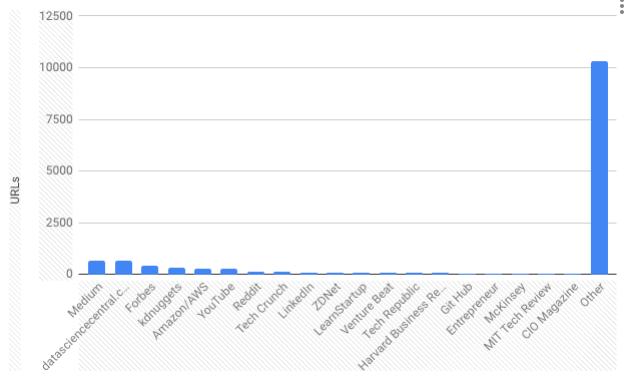
Across those 15,000+ URLs, I found more than 3,000 distinct domains. I expected a handful of major publishers to dominate they didn't. Even a big name like the Wall Street Journal turned out to be relatively sparse in data-science-related content. Instead, the results skewed toward a long tail of personal blogs and smaller sites, which was a pleasant surprise.
Open Graph Helps — But It's Not Enough
If you need common metadata from a page, Open Graph is a huge help. It's the protocol that makes link previews on Twitter and other social networks work — grab a few standard properties from the HTML and you get a title, author, and image with minimal effort.
The catch:
- Only about 80% of the pages I scraped supported Open Graph. The rest needed fallback logic.
- Open Graph alone isn't enough for deeper analysis. Title, publish date, and share image are useful, but if you need more than that, you're back to parsing raw HTML — and there's no real standard to lean on.
Don't Worry Too Much About Paywalls
I initially planned to skip well-known paywalled sites entirely. That turned out to be overly cautious — you can still pull basic metadata (often via Open Graph), along with summaries and keywords, from the public-facing parts of most paywalled pages. And in my experience, site owners were fine with scraping whatever they'd already made publicly available.
Revisit and Revise Your Scraping Logic Often
Early on, I fixed a few bugs, let the scraper run unattended for days, and assumed it was working. It wasn't not fully. I was quietly losing data and had to go back and re-scrape once I caught the gaps.
Two examples:
- Missing Open Graph fallbacks. When
og:titlewasn't present, I needed to fall back to the<title>tag — a small fix, but one I only caught after losing data on pages that lacked Open Graph support. - Inconsistent
Content-Lengthhandling. As noted above, not every response includes that header. If you want to play it safe, skip pages that omit it. If you want more coverage, read the response in chunks instead — more effort, but more complete.
In Summary
Web scraping isn't new, and it remains one of the most reliable ways to gather data for analysis or content curation. But there's no single "correct" way to do it. The best results come from following good practices, scraping ethically, and treating your scraping logic as something to keep refining — not a script you write once and walk away from.